Mark Lorenz on Technology

Thursday, April 05, 2007

Technical book recommendations

The technical world is moving at ever-increasing speed. It is virtually impossible to keep up with but a few topics. Certainly, there are a plethora of articles and tutorials online, but there are some topics that are extensive enough to require and/or are explained better in books. I thought I'd list some books I've found to be of great value:
I'm sure you have some books you can't live without - what are they?
Also, here is my hierarchy of publishers in order by quality first:
  • Best: Manning and O'Reilly
  • Good: Addison-Wesley
  • Mixed: Prentice Hall
  • All the rest...
How do you rank the publishers?

Labels: , , , , , , , , , ,


| 0 comments links to this post

Tuesday, April 03, 2007

Launch just about everything from your desktop


With Launchy. Launchy is a free Windows program that does, well, just about everything you can think of to launch. You bring up Launchy using Alt-Spacebar. Some of the things you can do:
  • Go to a web site
  • Search Wikipedia
  • Search Amazon
  • Look up the weather for a location
  • Run an installed program
  • Search the web using Google
  • Search Netflix
  • Find songs by title
  • and much more
Launchy shows you choices as you type. Try it out - you will interact with your computer differently. No more searching menus, files, or web pages ... they're just a Launchy away! I know I sound like an ad, but I don't have any relationship to Launchy except as a fan(atic).

Labels: , , , , ,


| 0 comments links to this post

Wednesday, January 17, 2007

Turbocharge your web with Hyperwords


Hyperwords adds searches, reference lookup, direct emailing, map directions, shopping, and much more to your web browser. Select any text and the hyperwords menu appears.
______________
The net is a massively-connected set of pages, people, products, and passions. Navigating this colossal mass is often tedious and hit-or-miss. If you look at some recent massive collaboration tools, such as del.icio.us, StumbleUpon, and LinkedIn, they are successful because they help people find things that they didn't even know existed...and do it quickly and easily.

To me, Hyperwords is like that: it helps you quickly and easily find and share information. All that Hyperwords does can be done in other ways...it's just that the other ways are more convoluted, which makes them less likely to happen. People are inherently lazy, myself included. If I can share something via email by merely swiping some text and choosing "email immediately", I'll do it often; if I must copy some text, bring up my email tool, create a new email, and paste in the text, I'm much less likely to do it. The same applies to adding a movie to my Netflix queue, looking up a word's definition, or following a URL that's not a link.

Hyperwords creates virtual links on the Web to make it more useful, accessible, and fun.
______________
Firefox Hyperwords Add-on

Labels: , , , , , , , ,


| 0 comments links to this post

Tuesday, August 29, 2006

XML Architecture tutorial

Check out the XML architecture tutorial I wrote for IBM developerWorks.

Comments are welcome!

Labels: , , , , ,


| 0 comments links to this post

Friday, April 14, 2006

Head First Labs :: Head Rush Ajax

Very cool book - have fun while learning Ajax hands-on

Read more at www.headfirstlabs.com/b...


| 0 comments links to this post

Friday, March 03, 2006

Handling user messages on Java projects

In my past projects, messages to display to the end user were handled in different ways, most not optimal. Recently, I have started putting references to standard informational, verification, and error messages in a supplementary specification and referring to them in the project's use cases.

This post presents an arguably better way to handle user messages. The messages are reused across the system, which results in consistent wording, and since the messages are centralized they are easier to change (in one place). It also facilitates internationalization. The parts of this design are:
Note: MessageFormat was introduced in the Java 1.3.1 release
UserMessages.properties file
  • This is a textual file that is easily edited to define the format and content of the messages used by the system. The owners of this file are the project's SQEs.
  • The format of a message is key=value, where
    • key is a unique identifier for the message (e.g. ERR0001)
    • value is the text of the message, with indications of where to insert parameters (e.g. Delete {0} from the system?)
  • The only restriction in the text is that quotes must be preceded by a backslash (e.g. {0} named \"{1}\" is already defined.)

UserMessages.properties
//Note: If you want a quote in your message, you MUST precede it with a backslash.
//E.g.:
//SAMPLE0001=Patient named \"{0}\" not found.
//results in the message
//Patient named "Fred Smith" not found.
//
//See the User Messages specification in PVCS for more information.
//
//--- Informational Messages ---
INF0003={0} {1} was successful.
INF0004=No matches found. Please try again.
//
//--- Verification Messages ---
VER0001=Delete {0} from the system?
VER0005=Permanently inactivate customer account {0}?
//
//--- Error Messages ---
ERR0001={0} named \"{1}\" is already defined. Please choose another name.
ERR0005={0} is not a valid IP address. IP addresses are formatted as four integers separated by periods: \“N.N.N.N\”. Please try again.
ERR0007=The date ranges must occur in chronological order. Please try again.
ERR0010=Order {0} is in {1} state and cannot be canceled.
ERR0011=Account {0} already has an update with effective date {1}. Please choose another date.
ERR0015=Account {0}: Effective date must be current date or later. Please try again.


UserMessage.java file
  • This class creates MessageFormat objects for each message in the UserMessages.properties file.
  • The important method is the format( messageID, args ) method.

UserMessage.java
/**
*
*/
package com.yourcompany.util;

import java.io.IOException;
import java.text.MessageFormat;
import java.util.HashMap;
import java.util.List;
import java.util.Map;
import java.util.PropertyResourceBundle;

/**
* An output formatted appropriately for an end user.
*
* @author lorenzm
*/
public class UserMessage {
//Constants MUST match UserMessages.properties file
//
// --- Informational Messages ---
public static final String INF0003 = "INF0003";
public static final String INF0004 = "INF0004";
//
// --- Verification Messages ---
public static final String VER0001 = "VER0001";
public static final String VER0005 = "VER0005";
//
// --- Error Messages ---
public static final String ERR0001 = "ERR0001";
public static final String ERR0005 = "ERR0005";
public static final String ERR0007 = "ERR0007";
public static final String ERR0010 = "ERR0010";
public static final String ERR0011 = "ERR0011";
public static final String ERR0015 = "ERR0015";

protected static Map userMessages;
protected static PropertyResourceBundle userMessageBundle;

/**
* Should use static methods
*/
private UserMessage() {
super();
}

/**
* read my file and initialize my MessageFormat objects
*/
protected static void initialize() throws IOException {
userMessageBundle = new PropertyResourceBundle(
ClassLoader.getSystemResourceAsStream("UserMessages.properties"));
userMessages = new HashMap();
// --- Informational Messages ---
userMessages.put( INF0003, new MessageFormat( userMessageBundle.getString(INF0003) ) );
userMessages.put( INF0004, new MessageFormat( userMessageBundle.getString(INF0004) ) );
// --- Verification Messages ---
userMessages.put( VER0001, new MessageFormat( userMessageBundle.getString(VER0001) ) );
userMessages.put( VER0005, new MessageFormat( userMessageBundle.getString(VER0005) ) );
// --- Error Messages ---
userMessages.put( ERR0001, new MessageFormat( userMessageBundle.getString(ERR0001) ) );
userMessages.put( ERR0005, new MessageFormat( userMessageBundle.getString(ERR0005) ) );
userMessages.put( ERR0007, new MessageFormat( userMessageBundle.getString(ERR0007) ) );
userMessages.put( ERR0010, new MessageFormat( userMessageBundle.getString(ERR0010) ) );
userMessages.put( ERR0011, new MessageFormat( userMessageBundle.getString(ERR0011) ) );
userMessages.put( ERR0015, new MessageFormat( userMessageBundle.getString(ERR0015) ) );
}

/**
* @param messageID Must be one of my constants and must be in my .properties file
* @param args Strings, Dates, ... to fill into message; can be null if no params needed
* @return A formatted message, else null (invalid messageID or args)
*/
public static String format( String messageID, List args ) {
if( userMessages == null ) {
try {
initialize();
} catch (IOException e) {
//File is missing!
e.printStackTrace();
return null;
}
}
MessageFormat userMessage = null;
try {
userMessage = getMessage( messageID );
} catch (IllegalArgumentException e) {
//No such message ID!
e.printStackTrace();
return null;
}
if( args == null || args.isEmpty() )
return userMessage.toPattern(); //nothing to fill in!
String formattedMessage = null;
try {
formattedMessage = userMessage.format( args.toArray(), new StringBuffer(), null ).toString();
} catch (IllegalArgumentException e) {
//Wrong types of params!
e.printStackTrace();
return null;
}
int unusedParamIndex = formattedMessage.indexOf("{");
if( unusedParamIndex > 0 ) { //found {n} - wasn't used
//Wrong number of params!
IllegalArgumentException e = new IllegalArgumentException(messageID + ": Too few parameters");
e.printStackTrace();
return null;
}
return formattedMessage;
}

/**
* @param messageID Must be one of my constant identifiers
* @return my MessageFormat identified by messageID
* @throws Exception
*/
protected static MessageFormat getMessage(String messageID) throws IllegalArgumentException {
if( userMessages.containsKey(messageID) )
return (MessageFormat)userMessages.get(messageID);
else {
throw new IllegalArgumentException( messageID + " not found" );
}
}

}

Client code
  • I've included my JUnit test file, which exercises multiple valid and invalid uses of UserMessage.format().
  • Clients only have to write String formattedMessage = UserMessage.format(messageID, args);. Assuming the arguments are valid, that's it (null is returned when invalid arguments are sent, which is really a bug in the client code).

UserMessageTest.java
package com.yourcompany.util;

import java.util.ArrayList;
import java.util.List;

import junit.framework.TestCase;

/**
* The class UserMessageTest contains tests for the class {@link
* UserMessage}
*
* @pattern JUnit Test Case
* @generatedBy CodePro
* @author lorenzm
* @version $Revision$
*/
public class UserMessageTest extends TestCase {

/**
* Construct new test instance
*
* @param name the test name
*/
public UserMessageTest(String name) {
super(name);
}

/**
* Launch the test.
*
* @param args String[]
*/
public static void main(String[] args) {
junit.textui.TestRunner.run(UserMessageTest.class);
}

/**
* Perform pre-test initialization
*
* @throws Exception
*
* @see TestCase#setUp()
*/
protected void setUp() throws Exception {
super.setUp();
}

/**
* Perform post-test clean up
*
* @throws Exception
*
* @see TestCase#tearDown()
*/
protected void tearDown() throws Exception {
super.tearDown();
}

/**
* Run the String format(String, List) method test
*/
public void testSuccessfulFormatERR0001() {
// add test code here
String messageID = UserMessage.ERR0001;
List args = new ArrayList(2);
args.add("Department");
args.add("Sales");
String formattedMessage = UserMessage.format(messageID, args);
assertEquals(formattedMessage, "Department named \"Sales\" is already defined. Please choose another name." );
}

public void testSuccessfulFormatINF0004() {
// add test code here
String messageID = UserMessage.INF0004;
String result = UserMessage.format(messageID, null);
assertEquals(result, "No matches found. Please try again." );
}

public void testInvalidID() {
String messageID = "ERR9999"; //bogus!
List args = new ArrayList(2);
args.add("Department");
args.add("Sales");
String formattedMessage = null;
formattedMessage = UserMessage.format(messageID, args);
assertNull("Invalid ID should return null. Instead got: ", formattedMessage);
}

public void testWrongNumParams() {
String messageID = UserMessage.ERR0001;
List args = new ArrayList(1);
args.add("Department");
//left off name!
String formattedMessage = UserMessage.format(messageID, args);
assertNull("Missing parameter should return null. Instead got: ", formattedMessage);
}
}


That's it! It's not perfect, but solves many of the previous problems I've encountered with user messaging. Let me know if you have a better way.


| 0 comments links to this post

Creating Excel spreadsheets using jXLS

jXLS is a framework for working with Excel spreadsheet files (.xls). jXLS uses an Excel template file (.xlt) and model objects to read, write, and update .xls files, including the use of formulas, summary totals, conditional highlighting, graphs, and much more. Check it out - it works great.


| 0 comments links to this post

MagicDraw tips for modelers

One of the best, if not the best object-oriented modeling tools IMO is MagicDraw. I have used multiple modeling tools over the years, including Visio (yes, Visio), Rational Rose, Embarcadero Describe, Paradigm Plus, and Omondo. By far, the best one I've used is MagicDraw from No Magic.

I've used MagicDraw for a couple of years now (from v8.x to v10.5 currently) and certainly learned some things along the way. This post is my attempt to share these lessons learned so others can bypass some pain along the learning curve.
Please contribute to this post if you have tips to share!

MagicDraw has a lot of power and different ways to use it. I have mostly used it as an Eclipse plugin (see diagram), but occasionally used it as a standalone product due to some plugin restrictions. I have also used it remotely (what they call "offline" - meaning not connected to the Teamwork Server that is the repository of modeling artifacts).
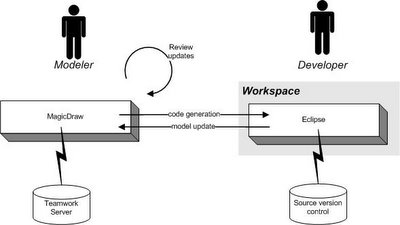


MagicDraw supports all the UML 2.0 diagrams, roundtrip engineering, sharing artifacts between modelers, and a lot more. See their site for all the details.

I've tried to organize the tips by categories, hopefully making it easier to find items of interest and skip those that may not apply to your situation. So, without further ado, here are my lessons learned:

General

  • Change your settings so that Operations do not show stereotypes or properties
Thanks to Patty Sullivan for this tip.
The default shows too much information IMO, cluttering up the diagrams. To simplify this, select Options/Project. In the resulting dialog, expand Symbols and then Shapes and select Class. Next, on the righthand side under Operations, change the Show Operations Stereotype and Show Operations Properties checkboxes to false. Select the Apply button to change your existing artifacts. Select OK to close the dialog.

Class Diagrams

  • Name the ends of your associations
If you do not, the resulting code will have variables declared as "_unnamed".
  • Set the ends of your associations to the correct type for a "many" cardinality
Otherwise, you will get the type declared in the resulting code instead of a Collection subtype. Open the specification of the association attribute, select Language Properties, then under your language (e.g. Java), pick the proper type for the Container.
  • Enter assertions as commentary on your classes and methods
This allows you to use tools like CodePro to create more meaningful JUnit test cases automatically. Check out my posts on TDD and CodePro.

Interaction Diagrams

  • Reverse engineer sequence diagrams from existing code
Enterprise edition only
Thanks to Patty Sullivan for this tip
If you have existing code, rather than create sequence diagrams Select Tools/Model Visualizer. In the resulting dialog, select the sequence diagram option and continue with the wizard from there to specify the details for your particular design.

Using MagicDraw as an Eclipse plugin

  • Increase startup resources
If you don't, you may run out of heap space, which is never a good thing. Here is what I've been using to start Eclipse (adjust to fit your situation):
C:\eclipse\eclipse.exe -vmargs -Xms256m -Xmx1024m -XX:MaxPermSize=128M
  • Use the standalone MagicDraw to generate reports
This is a bug as of the 10.5 release. It may have been fixed.
Report generation from the plugin does not work!
  • Watch for duplicate methods and variables
When you edit source in Eclipse (or WSAD or RAD), MagicDraw can't always tell whether you are replacing a method or variable or creating a new one. Even if you use refactoring to make changes, that doesn't cross the MagicDraw-Eclipse boundary. Similarly, if you make changes in MagicDraw, you may not end up with exactly what you want on the Eclipse side. So, depending on how you work and what settings you have for your Integration options, you can end up with artifacts that need to be cleaned up.

Miscellaneous

  • Use offline to take your model on the road
Thanks to Donatas Simkunas for this tip.
In order to work offline, the first thing you must select Options/Environment, then Floating and set "Auto login to floating license server" to false. This will take effect the next time you start your MagicDraw client. You will be offered an auto login option via a dialog at startup - do not check that option or you will not be able choose to work offline (this is also how you pick the type of license you want to use if you have more than one type).

When starting MagicDraw, you will get a dialog to choose which license you want to use (this is the second dialog - the first one is the license server login). Also on this dialog is the choice of "offline" or "online". You will choose offline. This allows you to work without a connection to the license or teamwork servers for a certain period of time.
Note: The period of time is set by default to 24 hours. You can change this setting by editing the Offline Session Time value on the Users tab of the Administrator's Console.

Note: The only artifacts that you will be able to change in offline mode are ones you have created without committing them to the Teamwork Server and ones that you have specifically locked for editing. This is done via a menu action and causes your login ID to appear next to the artifacts in the Containment Tree.
When you are done working offline, you should choose Help/Finish Floating License Session. Make sure you have visibility to the Teamwork Server as this will reconnect you. If you exceed the time for working offline, you will not be able to start your MagicDraw license until you have access to the MagicDraw server.
  • Adjust server settings
Thanks to Vilma Lukoseviciene for this tip
There is no way to tell the MagicDraw server that a particular client is logged off, such as when a client system has crashed. However, you can change the duration of time that it takes for the connection to time out, thereby dropping the user and freeing the license.

To do this, you should login to the Teamwork Administrator's Console and change
(decrease) the values for the muserver.ping.time and muserver.ping.timeout.time
in the Properties tab. After changing these properties you need to restart the Teamwork Server.

The muserver.ping.time is the time interval for the Teamwork Server to ping clients. After sending a ping, the server waits for an answer from the client. If an answer is not received during the muserver.ping.timeout.time interval, the user is logged out (and can therefore log back in).

Unsupported Functionality

No tool has everything. Here are some features that I'd like to have, but MagicDraw does not currently (v10.5) support:
  • More support for refactoring
E.g. I've wanted to be able to change a class into an interface or vice versa. You can't. You have to create the one you want yourself, but MagicDraw does make it easy to move methods, variables, and relationships (just DnD).
  • Sorting of methods within the class properties dialog does not work
This is a known bug and may be fixed when you read this. If it doesn't, it's not something you're doing wrong.
  • Using MagicDraw with AndroMDA doesn't work for MagicDraw 10.x
This used to work, but currently (as of 10.5) this no longer works. So, use MagicDraw 9.x if you want to use AndroMDA. If you've already got a MagicDraw 10.x project, you are out of luck - MagicDraw is not backwards compatible. Again, this may have been fixed, so check it out.

Troubleshooting

When things go wrong, you are going to want to send your md.log file in your MagicDraw home directory (you can edit this down to smaller size if it's getting large) as well as screen snapshots and/or code as appropriate. Here are some known problems and why they might occur:
Symptom: Classes you know exist are not available.
Possible reason: Depending on the template you chose when you created a project, different classes will be available. Not to worry if some you need are missing - select File/Import and browse to the templates directory and import the file(s) you need (e.g. java.util.xml.zip for Java 1.4.2 classes).

Thanks to Patty Sullivan for this tip.
Symptom: Existing classes fail when attempting to reverse engineer.
Possible reason: The Java version may not be correct for the code. E.g. Parsing works differently using Java 1.5 or 1.4 as the target. Use Options/Project/Code Engineering/Java to change the target version.

Thanks to Patty Sullivan for this tip.
Symptom: You cannot edit a class, method, association, ...
Possible reason: You may not have everything involved locked for edit. E.g. to edit an association, you must lock the association and the elements at both ends.
Symptom: Names of transitions on state diagrams do not appear on the diagram.
Possible reason: You have to specify the names as the trigger and choose SignalEvent as the type to get the names to appear.
Thanks to Nerijus Jankevicius for this tip.
Symptom: When trying to login, a dialog says you are already logged in.
Possible reason: You probably just crashed your client for some reason. MagicDraw license server is supposed to free up your license after a timeout period. It doesn't always work. The only way I know to get back in is to stop and restart the MagicDraw server.

Resources

Labels: , , , , , , , ,


| 1 comments links to this post

Wednesday, March 01, 2006

More BIRT Tips for Java Developers

Last month, I wrote some tips for using BIRT from Eclipse to do your report generation. I promised more BIRT tips, so here they are:
  • Control page breaks
Thanks to Jason Weathersby for this tip.
For example, you may want to only have a page break after the first page (or last or whatever conditions). To do this you would:
  • Select the report page and go to the Script page. Add "firstPage = 0;" on a separate line.
  • Add a table to your report.
  • Add a group to your table.
  • Select the group header row and go to the Script page.
  • Go to the onCreate scripting page and add this logic:
          if( firstPage > 0 ) {
this.getStyle().pageBreakBefore = "Always";
} else {
this.getStyle().pageBreakBefore = "Avoid";
firstPage = firstPage + 1;
}
That's it! Now all pages after the first will have a page break before them.

Note: This does not work with a List. Believe me, I tried. So unless you just want the learning experience of a hard spanking, stick to Tables.

Note: To force page "breaks" for HTML output, use the Page Break Interval field. E.g. you could specify a new page every 50 lines. This is necessary because browsers can be resized, so the number of lines can change.

  • Set up your Master page properly
Thanks to Diana Peh for this tip.
The Master page of your report has some rules that must be followed:
  • You can insert only one top-level element in the header or footer. By default
    there's already a date element in the footer. You must delete the date element if you want to add something else (e.g. a page element).
  • If you want to insert multiple elements, delete the date element first,
    insert a grid, then insert as many elements as you want in the grid.
  • No data set fields can be used on the Master page.

  • Avoid specify dimensions in percentages (%)
Percentages for width or height does not work as you might expect. E.g. resizing a browser window will affect the artwork or chart that is sized by percentages. Use inches or some other metric.

A small Report framework to reuse

This isn't exactly a tip, but more of a leg up. Here's an abstract Report class that you can set up a small framework to support BIRT reporting:


/**
*
*/
package com.yourcompany.domain.reporting;

import java.security.InvalidParameterException;
import java.util.HashMap;

import org.eclipse.birt.report.engine.api.EngineConfig;
import org.eclipse.birt.report.engine.api.EngineConstants;
import org.eclipse.birt.report.engine.api.EngineException;
import org.eclipse.birt.report.engine.api.HTMLCompleteImageHandler;
import org.eclipse.birt.report.engine.api.HTMLEmitterConfig;
import org.eclipse.birt.report.engine.api.HTMLRenderContext;
import org.eclipse.birt.report.engine.api.HTMLRenderOption;
import org.eclipse.birt.report.engine.api.IReportRunnable;
import org.eclipse.birt.report.engine.api.IRunAndRenderTask;
import org.eclipse.birt.report.engine.api.ReportEngine;

/**
* @author lorenzm A formatted output document that can be viewed, printed,
* faxed, stored.
* @version $Revision: 1.1 $
*/
public abstract class Report {

/**
* A descriptive String set by my concrete subclasses at construction time.
*/
protected String name;
protected String format =PDF_FORMAT; //default PDF
public static final String PDF_FORMAT =HTMLRenderOption.OUTPUT_FORMAT_PDF;
public static final String HTML_FORMAT =HTMLRenderOption.OUTPUT_FORMAT_HTML;
protected static EngineConfig config;
protected static ReportEngine engine; //only create ONE engine for ALL reports

/**
* Constructor with required associations and/or state
*
* @pre name != null && name.length >0
* @param name
*/
public Report(String name) {
super();
this.name = name;
}

/**
* Set up for BIRT report generation. Subclasses will
* do the actual generation based on their own designs,
* but using the one and only engine I create.
* @return Returns the engine.
*/
protected ReportEngine getEngine() {
if( engine == null ) {
config = new EngineConfig( );
config.setEngineHome( "C:\\BIRT\\birt-runtime-2_0_0\\Report Engine" ); //TODO Set CORRECT home!!
// config.setLogConfig("C:\\BIRT\\logs\\", Level.FINER);
//only create ONE engine for ALL reports
engine = new ReportEngine( config );
// Create the emitter configuration.
HTMLEmitterConfig hc = new HTMLEmitterConfig( );
// Use the "HTML complete" image handler to write the files to disk.
HTMLCompleteImageHandler imageHandler = new HTMLCompleteImageHandler( );
hc.setImageHandler( imageHandler );
// Associate the configuration with the HTML output format.
config.setEmitterConfiguration( HTML_FORMAT, hc );
}
return engine;
}

/**
* Create a formatted output file using a BIRT .rptdesign XML file.
*/
public void generate() {
//------ Run reports
//--> IF params are needed for the report,
// add logic at http://eclipse.org/birt/index.php?page=deploy/engine.html

// Output can be HTML or PDF. PDF is default.
IReportRunnable report = null;
try {
System.out.println(getDesignFilepath()); //TODO remove for production
report = getEngine().openReportDesign( getDesignFilepath() );
} catch (EngineException e) {
e.printStackTrace();
return;
}
// Create a separate task for EACH report
IRunAndRenderTask task = getEngine().createRunAndRenderTask( report );
// Set up options.
HTMLRenderOption options = new HTMLRenderOption( );
// HTML (if specified) or PDF (default)
options.setOutputFormat( format );
String outputPath = "C:\\BIRT\\"; //TODO change to deployment location
outputPath += getOutputFilename();
options.setOutputFileName(outputPath);
task.setRenderOption( options );
HTMLRenderContext renderContext = new HTMLRenderContext();
renderContext.setImageDirectory( "./images" );
HashMap appContext = new HashMap();
appContext.put( EngineConstants.APPCONTEXT_HTML_RENDER_CONTEXT, renderContext );
task.setAppContext( appContext );
// Set parameter values using a HashMap. Parameters are name/value pairs.
// The values must be Java objects of the correct type.
HashMap params = getParameters(); //each report has its own params
task.setParameterValues( params );
task.validateParameters();

// Run the report.
try {
task.run( );
} catch (EngineException e) {
e.printStackTrace();
}
}

/**
* Only destroy the BIRT engine when exiting.
*/
public static void shutdown() {
engine.destroy( ); //cleanup
}

/**
* @return Parameter values to use
* Key = param name, Value = param value
*/
protected abstract HashMap getParameters();

/**
* @post $result != null
* @return The location of my BIRT .rptdesign file.
*/
protected abstract String getDesignFilepath();

/**
* @pre format == HTML_FORMAT || format == PDF_FORMAT
* @param format
* Must be HTML or PDF BIRT constant!
* @throws InvalidParameterException
* @throws Exception
*/
public void setFormat(String format) throws InvalidParameterException {
if( format.equals( PDF_FORMAT ) || format.equals( HTML_FORMAT ) ) {
this.format = format;
} else {
throw new InvalidParameterException("Invalid report format: " + format );
}
}
/**
* Return my name as the filename, with ".pdf" or ".html" as the extension
* based on my current format.
*
* @return String my name as the filename
*/
public String getOutputFilename() {
if( format.equals( PDF_FORMAT ) ) {
return getName() + ".pdf";
} else {
return getName() + ".html";
}
}

/**
* @return String
*/
public String getName() {
return name;
}

/**
* Method toString.
* @return String
*/
public String toString() {
return getName();
}
}


A concrete subclass would look like this:


package com.yourcompany.domain.reporting;

import java.util.ArrayList;
import java.util.HashMap;
import java.util.List;

/**
* A Report of ...
* @author lorenzm
* @version $Revision: 1.1 $
*/
public class MyReport extends Report {
protected One one;
protected Two two;

/**
* Constructor with required parameters.
* @param one ...
* @param two ...
*/
public MyReport(One one, Two two) {
super("My Report");
this.one= one;
this.two= two;
}
/**
* Method getDesignFilepath.
* @return the complete path to my BIRT design file
*/
protected String getDesignFilepath() {
return "C:\\BIRT\\MyReport.rptdesign";
}
/**
* Method getParameters.
* @return my BIRT design input params
*/
protected HashMap getParameters() {
HashMap params = new HashMap();
params.put("one", one);
params.put("two", two);
return params;
}
/**
* Method toString.
* @return String
*/
public String toString() {
return "meaningful string, such as getName() + getParamString()"
;
}
}


That's it for now! Hope this has been beneficial.
Mark

Labels:


| 3 comments links to this post

Cool Tools

There are some huge benefits to the web. One benefit is there are a lot of great things available, often for free. One drawback is there is so much to offer that it takes a lot of time and energy (and sometimes pain) to pick the good from the bad and the ugly.

With that in mind, I thought I'd talk about some really cool finds that you may enjoy, in no particular order:
This gem of a program carries a lot of nice features in a compact tool. It will save your copious user IDs and passwords in a secure manner that still allows ease of use. E.g. you can have Password Safe go to a URL and then enter the user ID and password and press submit.
I know ... everyone has their favorites. These are mine:
  • CustomizeGoogle - strip out ads in search results
  • Google Suggest - suggests search terms as you type
  • Map This - select an address on a web page and get a map
  • Tab Mix Plus - the greatest multi-tab extension ever; you should try this
  • Fetch Text URL - go to a URL straight from text on a web page
  • TargetAlert - shows visual cues for destinations of hyperlinks
  • QuickNote - Note taking from your browser
  • Copy URL+ - Copy selection, page URL, and/or title to the clipboard
  • Answers - Alt+Select on a word to get a definition and references
  • Fasterfox - Performance enhancements to Firefox
  • Forecastfox - Nicely done weather info
  • Sage - view and manage RSS feeds
  • ReminderFox- view and manage reminders and to-do's
  • (not an extension, but my favorite theme is Silver Skin)
Excellent and free side-by-side differences and merging of files.
Quick and (relatively) easy storyboarding. Put together UI pages and navigate between them right away. A bit quirky to get used to, but fast and useful output.
Some overlap with Sage, but AWR allows you to do more. You can add web pages, not just feeds...and you can see highlighted changes. Nice.
  • MagicDraw community edition (Eclipse plugin too)
Certainly, if you have the money in your budget, the full versions are highly recommended. The nice thing is the community edition lets you try out UML modeling on a limited scale.
The commercial version has some neat visual development tools, but the free community edition still will help if you are doing JSF and Ajax development.
If you're a Java developer, you should get CodePro. It will intelligently generate meaningful unit tests, fill in JavaDocs, examine metrics, and do much more.
Very nice screensaver. View real satellite images of the planet with accurate daylight and times at various places across the world. Different resolutions available. Update as often or seldom as you like.
Free tool that will remove spyware and adware from your computer and protect you from further infestations.
(Just about) everything you'd ever want for text editing, including sorting, side-by-side scrolling, marking all instances of a string, and so much more.
A super, free set of desktop tools, including working with documents, spreadsheets, presentations, drawings, and more. I'd be very afraid if I was the evil empire!


| 7 comments links to this post